01 · Issued on payment
A signed key, the moment an order is paid.
Every paid order mints a license key, emails it to the buyer and saves it to the order.
For WooCommerce, WordPress, Shopify, SaaS and JUCE
A signed, device-locked key for every sale and every demo. Refunds revoke it automatically.
Free to start, no time limit. Selling on Shopify? Get the Shopify app.
Features
From the moment an order is paid to the day a refund lands, nothing in the loop needs a person.
01 · Issued on payment
Every paid order mints a license key, emails it to the buyer and saves it to the order.
02 · Revoked automatically
A refund marks the key revoked, so it stops working with no manual cleanup.
03 · Verified offline
The signed key is verified on the customer's machine, so it works with no network.
04 · Device limits
Set a limit per product. A fourth device is turned away, and the buyer releases one to make room.
05 · Buyer self-service
A My Licenses page shows every key and lets the buyer release a device.
06 · Support tools
Release a seat or grant an extra activation straight from the order.
Platform agnostic
A license belongs to your product, not to the store that sold it. Start on WooCommerce and move to Shopify later, or the other way around, and every key you have already issued keeps working.
Keys already in customers' hands stay valid. There is nothing to reinstall, re-enter or buy again.
Your plugin or app only ever talks to the license service. It sees a key and the API, so it cannot tell which store made the sale.
Run a WooCommerce store and a Shopify store side by side. Both issue keys from one account, for the same product.
Adding the second store takes one step: link its product to the one you already have. The Shopify app matches them by SKU, and asks you once if it cannot tell.
Audio plugins
A drop-in licensing kit for JUCE plugins and standalone apps. Add it with CMake, fill in a short config, and you get a finished activation screen, a free demo period, and license checks that work offline.
Link one imported target. Releases are pinned to an exact version.
Activate, start a demo, name the device and manage seats in one ready-made component. Re-skin it to match your plugin.
Your processBlock only reads a flag. All license checking runs on the message thread.
Signed licenses are checked on the device, tied to one machine, and protected against clock rollback.
# JUCE first: the kit's package needs its targets.
add_subdirectory(JUCE)

# The unpacked kit.
find_package(WaveformLicenseManager CONFIG REQUIRED
    PATHS "${CMAKE_CURRENT_SOURCE_DIR}/third_party/waveform-license-manager"
    NO_DEFAULT_PATH)

# Link the imported target.
target_link_libraries(MyPlugin PRIVATE
WaveformLicenseManager::WaveformLicenseManager)waveform::Config cfg;
cfg.productId = "<your productId>";
cfg.publicKeyB64 = "<your merchant public key>";
cfg.onLicenseChanged = [this] { publish(); };
// The audio thread reads one atomic, nothing else.
void processBlock(AudioBuffer<float>& buffer, ...) {
if (licensed.load(std::memory_order_relaxed)) return;
applyUnlicensedDegradation(buffer);
}Update notifications
Publish a release from the WooCommerce plugin or the Shopify app. Everyone running your plugin or app sees a notice inside it, with your release notes and a link to the right download for their platform.
A ready-made banner for JUCE plugins, and a single call in the SDK for other apps. It never blocks use.
Every notice is signed with your own key and verified before it is shown, so no one can point your customers at a fake update.
Add release notes, mark a release important, and give a link for each platform.
Send a beta to your testers without bothering everyone else.
Customers can dismiss a release. The next one still reaches them.
Customers see the notice inside your software, and you can email everyone who owns it. Both come from the same release.
Notices travel with the license check, so there is nothing extra to run, and a failed check never locks anyone out. They link to your download page or installer and never install anything on their own.
Version adoption
The Releases page lists every version in the field with its device count and share, so you know how many customers are still on an old build before you retire it. In the Shopify app, you can then email everyone who owns the product from the same page.
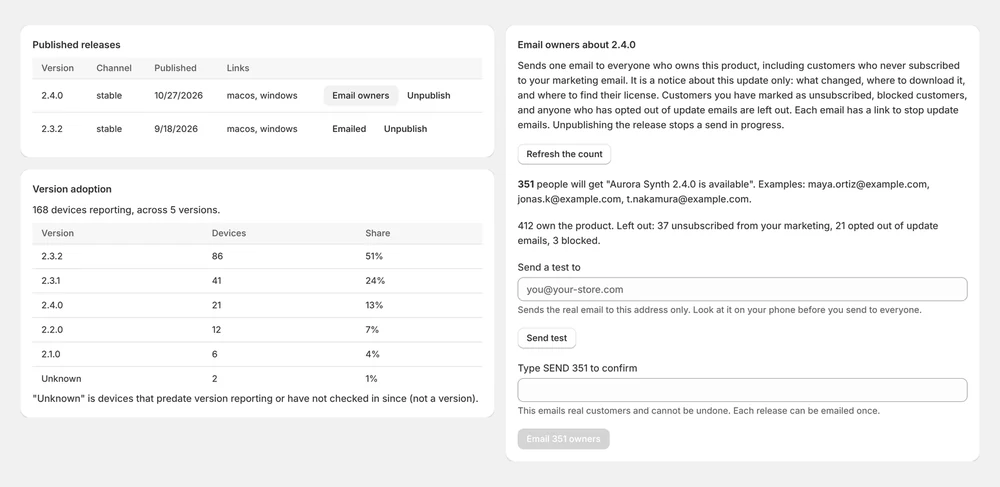
Licensed devices per version, as a count and a share, as of their last license check. Devices that have not reported a version are listed as Unknown. In the WooCommerce plugin and the Shopify app.
Send the announcement to everyone who owns the product, including buyers who never joined your marketing list. It covers what changed, where to download, and where to find their license. In the Shopify app.
You see the recipient count first and can send yourself a test. Sending takes a typed confirmation, each release is emailed once, and anyone who unsubscribed or opted out is left out. Every email carries an unsubscribe link.
How it works
Add the WooCommerce plugin to your WordPress site (on Shopify, install the app from the Shopify App Store) and turn on licensing for a product.
Add license verification to your software with the Waveform SDK, or drop the JUCE kit into your audio plugin.
Keys are delivered on every order and kept in sync for the life of the license.
See every screen in WooCommerce and Shopify Try the API in five minutes
Pricing
Pay monthly, or yearly for two months free. Plan questions, answered.
Try it out
$0
Your first products
$29/mo
or $290/yr, 2 months free
Grow your catalog
$89/mo
or $890/yr, 2 months free
Scale and automate
$249/mo
or $2,490/yr, 2 months free
Enterprise
We set up a plan for your volume, priced to fit and agreed up front.
Checkout for WooCommerce and WordPress is opening soon, with the same plans and prices. Email us to hear the day it opens.
Install the app from the Shopify App Store. Same plans and prices, billed through Shopify.